
Displaying messages
1. "Office".
2. "Messages"
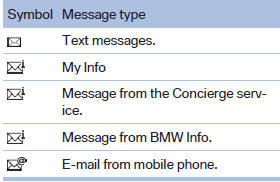
A symbol identifies the type of message.
See also:
Checking the pressure
Only check the tire inflation pressure when the
tires are cold. This means after driving no more
than 1.25 miles/2 km or when the vehicle has
been parked for at least 2 hours. When the tires
a ...
Indication in the info display
The information from the computer
is shown in the Info display
in the instrument cluster. ...
Notes
No loose objects in the
passenger compartment
Do not stow any objects in the passenger compartment
without securing them; otherwise,
they may present a danger to occupants for instance
durin ...