
Switching between cases, letters and numbers
Depending on the menu, you can switch between entering upper and lower case, letters and numbers:
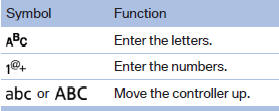
Without navigation system
Select the
 symbol.
See also:
General information
Enclosed areas
Do not let the engine run in enclosed
areas; otherwise, breathing of exhaust fumes
may lead to loss of consciousness and death.
The exhaust gases contain carbon monoxide, an
od ...
Features
The 2009 X3 starts at $39,700 and comes standard with leatherette upholstery,
eight-way power front seats, a panoramic moonroof and rain-sensing windshield
wipers. There are four option packages a ...
Vehicle equipment
All standard, country-specific and optional
equipment that is offered in the model series is
described in this chapter. Therefore, equipment
is also described that is not available in a vehicle, ...