
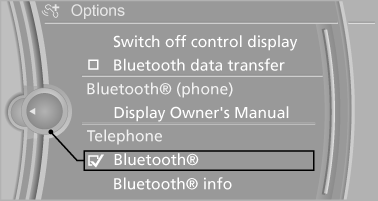
Activating/deactivating Bluetooth
Bluetooth is not permitted everywhere. Comply with all safety guidelines and regulations.
1. "Telephone".
2. "Options" Open.
3. "Bluetooth®"
See also:
Initiating an Emergency Request
1. Press the cover briefly to open it.
2. Press the SOS button until the LED in the
button lights up.
The LED lights up: an Emergency Request
was initiated.
If the situation allows, wait ...
DVD changer
Above the glove compartment
Press the button.
The cover opens automatically.
To close: press the cover closed.
Controls and displays
1 Empty DVD compartments
2 LED on DVD slot
3 Buttons for ...
Language
Setting the language
To set the language on the Control Display:
1. "Settings"
2. "Language/Units"
3. "Language:"
4. Select the desired language.
The setting is s ...