
Equalizer
Setting for individual audio frequency ranges.
Adjusting the equalizer
1. "CD/Multimedia", "Radio" or "Settings".
2. "Tone".
3. "Equalizer".
4. Select the desired setting.
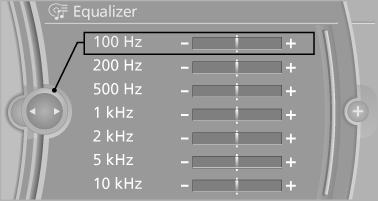
5. To adjust: turn the controller.
6. To store: press the controller.
See also:
Initialization after a power failure
After a power failure, it is only possible to raise
the roof, if necessary.
Have the system initialized by your service center. ...
Switching the warning function on/off
Switching the warning function on/off
Press the button
▷ On: the LED lights up.
▷ Off: the LED goes out.
The state is stored for the remote control currently
in use. ...
Tachometer
Always avoid engine speeds in
the red warning field. In this
range, the fuel supply is interrupted
to protect the engine. ...