
At a glance
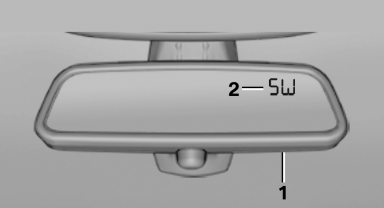
1 Control button
2 Mirror display
See also:
Status information
Status boxThe status box at the top right displays the following information:
> Time
> Current entertainment source
> Sound output ON/OFF
> Mobile phone network with strongest receptio ...
Locking the doors andwindows
Rear doors
Push the locking lever on the rear doors down.
The door can now be opened from the outside
only.
Safety switch for the rear
Press the button on the driver's
door if
children ar ...
Length, wheel base
Length, wheel base
1 Wheel base: 110.6 inches/2,810 mm
2 Vehicle length: 182 inches/4,624 mm ...