
SPORT
Sporty driving with optimized chassis and suspension with maximum driving stabilization.
The program can be configured to individual specifications. The configuration is stored for the remote control currently in use.
Activating SPORT
Press button repeatedly until SPORT is displayed in the instrument cluster.
Configuring SPORT
When the display is activated on the Control Display, the sport program can be set to individual specifications.
▷ Activate the sport program.
▷ "Configure SPORT mode".
▷ Configure the program.
Optionally, the sport program can be configured
before it is activated:
1. "Settings"
2. "SPORT mode"
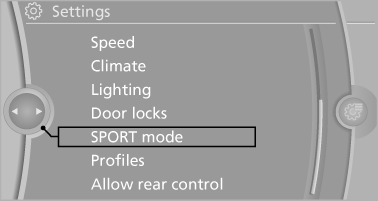
3. Configure the program.
This configuration is retrieved when the sport program is activated.
See also:
Top View
The concept
Top View assists you in parking and maneuvering.
The area around the doors and the road area
around the vehicle are shown on the Control
Display for this purpose.
Capturing the imag ...
Switching the microphone to mute
When a call is active, the microphone can be
muted.
1. "Telephone"
2. "Active calls"
3. "Microphone
mute"
A microphone that has been switched to mute
is automa ...
Service requirements
The remaining driving distance and the date of the next scheduled service are
displayed briefly immediately after you start the engine or switch on the ignition.
The extent of service work requi ...