
Assist system information
Display on the Control Display
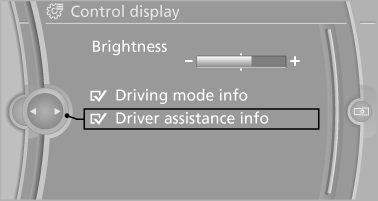
Information on the Assist system can be displayed by activating Assist on the Control Display.
1. "Settings"
2. "Control display"
3. "Driver assistance info"
See also:
New contact
1. "Contacts"
2. "New contact"
3. If input boxes are already filled with previous entries: "Delete input
fields"
4. To fill in the entry fi ...
Twin-scroll turbocharging
The new four-cylinder engines also feature twin-scroll turbocharging. This
means that the exhaust stream from cylinders 1 and 4, and the exhaust stream
from cylinders 2 and 3, follow separate spir ...
X3 in the Market
The compact luxury crossover segment has undergone a revolution since the
first-generation X3 debuted. Both the Q5 and GLK-Class have become popular
sellers, while X3 sales have lagged behind.
T ...