
Releasing
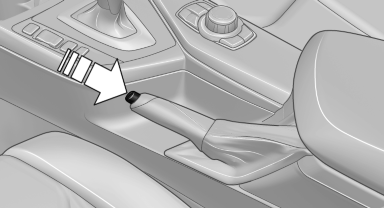
Raise lever slightly, press the button and guide the lever down.
See also:
Volume
► "Speed volume": speed-dependent volume
control.
► "PDC": volume of the PDC signal compared
to the entertainment sound output.
► "Gong": volume of ...
Parking lamps/low beams,
headlamp control
General information
If the driver door is opened with the ignition
switched off, the exterior lighting is automatically
switched off at the following switch settings:
0, ,
Parking lamps
Swit ...
General information
Instructions for voice activation system.
To have the available spoken instructions read
out loud: ›Voice commands‹ ...