
Adjusting the height
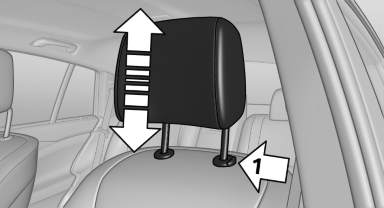
Adjusting the height
▷ To raise: pull.
▷ To lower: press the button, arrow 1, and push the head restraint down.
See also:
Vehicle equipment
All standard, country-specific and optional
equipment that is offered in the model series is
described in this chapter. Therefore, equipment
is also described that is not available in a vehicle, ...
Starting destination guidance
1. "Navigation"
2. Enter the destination.
3. "Accept destination"
4. "Start guidance"
► The route is shown on the Control Display.
► The distance to the ...
Initiating an Emergency Request
1. Press the cover briefly to open it.
Initiating an Emergency Request
2. Press the SOS button until the LED in the
button lights up.
▷ The LED lights up: an Emergency Request
was initi ...