
Opening/closing the glass sunroof and sliding visor together
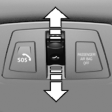
▷ Slide switch back to the resistance point and hold.
Glass sunroof and sliding visor open together as long as the switch is held down.
▷ Press switch back past the resistance point.
The glass sunroof and sliding visor open automatically.
Pressing the switch again stops the opening motion.
Analogously, the glass sunroof is closed by sliding the switch forward.
The sliding visor remains open and can be closed by hand.
Convenient operation, via the remote control.
Convenient closing, with Comfort Access.
See also:
High-visibility innovation: Adaptive LED Headlights.
The new BMW 6-Series Coupe is equipped with bi-xenon headlights as standard.
An accentuating trim element cuts across the top of the hallmark BMW twin round
headlights to produce the intent look f ...
Parking using the parking assistant
Personal responsibility
The parking assistant does not relieve the
driver of responsibility for the vehicle during the
parking procedure.
Watch the parking space and parking procedure
closely ...
Symbols used
Indicates precautions that must be followed
precisely in order to avoid the possibility of personal injury and serious damage
to the vehicle.
Indicates information that will assist you in
gai ...