
CD/multimedia
CD/DVD drive
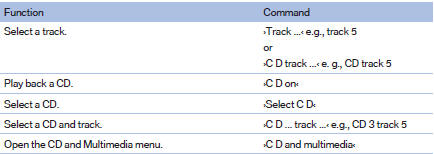

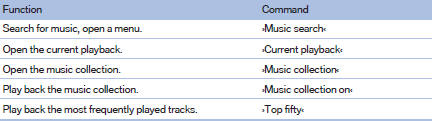
Music collection
External devices

Tone

See also:
Closing
Danger of pinching
Monitor the closing process and make
sure that the closing path of the window is clear;
otherwise, injuries may result.◄
► Pull the switch to the
resistance poin ...
Controls
1 Screen, left
2 Screen, right
3 Controller with buttons
4 CD/DVD player ...
Exterior: Dynamic proportions in perfect balance.
The proportions of the new BMW 5-Series Sedan are defined in archetypal BMW
style by the long wheelbase and hood, short overhangs, aft-set greenhouse, and
the coupe-like flowing roofline. The slig ...