
Tail lamps
▷ Turn signal, backup lamp: 21-watt bulb, H21W.
▷ Brake lamp, brake force display: 21-watt bulb, P21W
▷ Tail lamp: LED technology.
Contact your service center in the event of a malfunction.
Arrangement of tail lamps
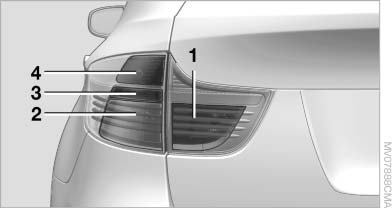
1 Brake force display/rear lamps
2 Brake lamp/rear lamp
3 Backup lamp
4 Turn signal
Brake lamps
1. Open the side panel in the cargo area.
2. Remove the first aid kit and warning triangle
if necessary.
3. Rotate the relevant bulb socket to the left
and remove.
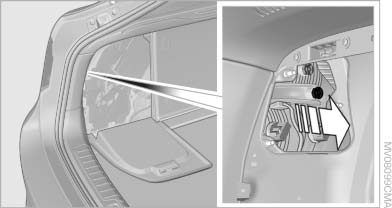
4. Apply gentle pressure to the bulb while turning
it to the left for removal and replacement.
5. Install in the reverse order.
Turn signal
1. Open the side panel in the cargo area.
2. Remove the first aid kit and warning triangle
if necessary.
3. Remove bulb holder along with bulb and replace.
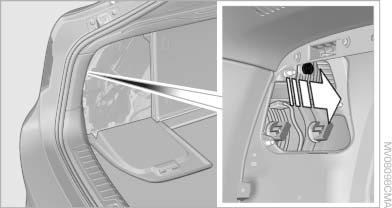
4. Install in the reverse order.
Backup lamp
1. Open the side panel in the cargo area.
2. Remove the first aid kit and warning triangle
if necessary.
3. Remove bulb holder along with bulb and replace.
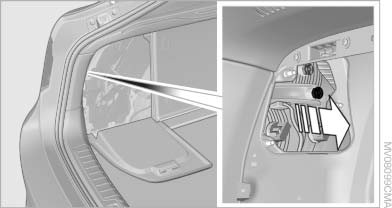
4. Install in the reverse order
Brake force display
1. Carefully remove the cover in the tailgate panel with a screwdriver.
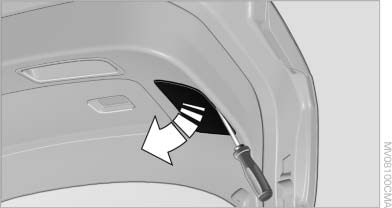
2. Rotate the bulb socket to the left and remove.
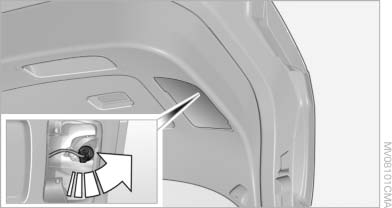
3. Apply gentle pressure to the bulb while turning
it to the left for removal and replacement.
4. Insert the bulb socket in the tailgate and engage
it.
5. Replace the cover.
License plate lamps
These lamps are made using LED technology.
Contact your service center in the event of a malfunction.
Center brake lamp
This lamp uses LED technology for operation.
Contact your service center in the event of a malfunction.
See also:
The concept
The central locking system becomes active
when the driver's door is closed.
The system simultaneously engages and releases
the locks on the following:
▷ Doors.
▷ Trunk lid.
▷ ...
Headphones, vehicle
loudspeakers
Connecting the headphones
Normal headphones
Connect via the jack 1/8"/3.5 mm, on the rear CD/DVD player.
Infrared headphones
Connection via the infrared interface on the
lower edge of the s ...
2009 BMW 535 Review by David Thomas
In the world of luxury station wagons, there isn't much sense in trying to
justify the price tag. Normally, a wagon is a practical choice for families
looking for utility with improved mileage ver ...