
Opening
1. Briefly press the rear edge of the fuel filler flap.
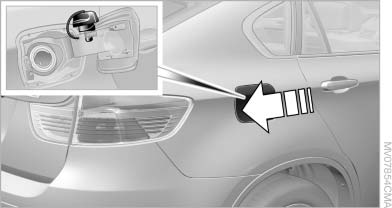
Opening
2. Turn the fuel cap counterclockwise.
3. Place the fuel cap in the bracket attached to
the fuel filler flap.
See also:
Navigation
This chapter describes how you can enter destinations and specify your route
so that your navigation system guides you reliably to your destination. ...
Tire inflation pressure values up to100 mph/160 km/h
X3 28i
X3 35i
...
Mobility
To ensure that you remain mobile at all times, this
chapter supplies you with important information
on the topics of fuels and lubricants, wheels and
tires, service, maintenance, and Roadside
...