
Operating BMW Online
To start a search:
▷ Turn the controller to highlight an element.
▷ Press the controller to display an element.
Opening the start page
1. Open "Options".
2. "Display start page"
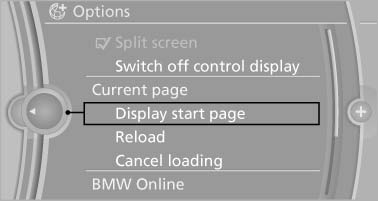
Opening the start page
Loading a new page
1. Open "Options".
2. "Reload"
Cancel
1. Open "Options".
2. "Cancel loading"
See also:
Rear CD/DVD player
1 CD/DVD slot
2 Eject CD/DVD
3 On/off, right
4 Headphone connection, right
5 RCA sockets
6 Headphone connection, left
7 On/off, left ...
Center armrest
Opening
Press the button, arrow 1, and fold the center
arm rest up, arrow 2.
Connection for an external audio
device
This can be used to connect an external audio
device, such as an MP3 play ...
Automatic climate control with enhanced features
Automatic climate control with enhanced features
1 Seat heating, left
2 Temperature, left
3 AUTO program
4 Display
5 Maximum cooling
6 Temperature, right
7 Seat heating, right
8 Cooling func ...