
Activating/deactivating Bluetooth
Bluetooth is not permitted everywhere. Comply with all safety guidelines and regulations.
1. "Telephone"
2. Open "Options".
3. "Bluetooth®"
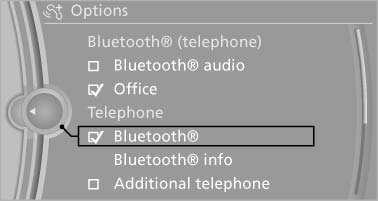
Activating/deactivating Bluetooth
See also:
Displaying special destinations in the
map
To display symbols of the special destinations
in the map view:
1. "Navigation"
2. "Map"
3. Open "Options".
4. "Display Points of Interest"
5. Select the ...
My Info
Starting destination guidance
1. Select the desired message.
2. "Start guidance" or "Add as another
destination"
Dialing the number in the message
Up to 4 phone numbers can b ...
Real-Time Traffic Information (RTTI) is a reliable congestion-fighter
The newly developed RTTI system from BMW ConnectedDrive can now also be
ordered as an option for the new BMW 3-Series Sedan in conjunction with a BMW
navigation system. The system is mobile phone- ...