
Connecting
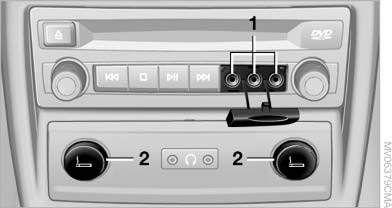
Connecting
1 Connections for audio/video cables. Watch the colors of the sockets when connecting.
Yellow socket: video White socket: audio on left Red socket: audio on right
2 Power supply for external device: socket with removable cap.
See also:
System limits
Be alert
Due to system limitations, warnings may
be not be issued at all, or may be issued late or
improperly. Therefore, always be alert and ready
to intervene; otherwise, there is the da ...
BMW TeleService
General information
TeleService supports communication with your
service center.
Data on the vehicle's service requirements
can be sent directly to the service center. In
this way, the se ...
Roller sunblind for rear window
General information
If you are no longer able to move the roller sunblind
for the rear window after having activated
it a number of times in a row, the system is
blocked for a limited time to p ...