
CD/DVD changer
In the glove compartment
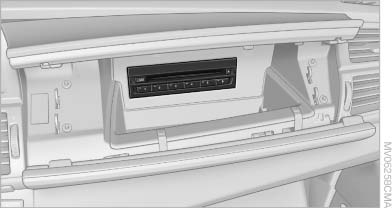
In the glove compartment
The BMW CD/DVD changer for six CDs/DVDs is located in the glove compartment
Controls and displays
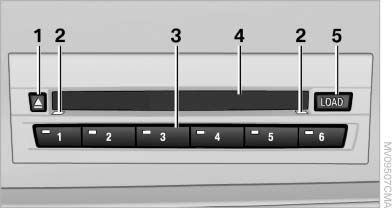
Controls and displays
1 Empty CD/DVD compartments
2 LEDs on the CD/DVD slot
3 Buttons for CD/DVD compartments
4 CD/DVD slot
5 Load CD/DVD compartments
Loading the CD/DVD compartments individually
1.  Press the
button.
Press the
button.
The LED on the first empty compartment flashes.
2. Select another compartment if necessary.
3. Wait for the LEDs on the DVD slot to flash.
4. Insert a single CD or DVD in the middle.
The CD/DVD is drawn in automatically and placed into the selected compartment.
 Sliding in CDs/DVDs
Do not insert the CD/DVD until the LEDs
on the DVD slot are flashing; otherwise, the CD/
DVD or the CD/DVD changer could be damaged.
Do not continue to push on the CD/DVD; this may cause it to jam and prevent it from being able to eject again.◀
Filling all vacant CD/DVD compartments
1.  Press the
button for a longer period.
Press the
button for a longer period.
The LEDs on the empty CD compartments flash.
2. Wait for the LEDs on the DVD slot to begin flashing and then insert each CD or DVD into the center of the slot.
The CDs/DVDs are drawn in automatically and placed into the vacant compartments.
Sliding in CDs/DVDs
Do not insert the CD/DVD until the LEDs
on the DVD slot are flashing; otherwise, the CD/
DVD or the CD/DVD changer could be damaged.
Do not continue to push on the CD/DVD; this may cause it to jam and prevent it from being able to eject again.◀
After they are inserted, it may take several minutes for the CDs/DVDs to be read in.
Removing a single CD/DVD
1.  Press the
button.
Press the
button.
2. Select the CD/DVD compartment.
The CD/DVD is partially ejected.
3. Remove the CD/DVD.
Removing all CDs/DVDs
1.  Press the
button for a longer period.
Press the
button for a longer period.
2. Remove the CDs/DVDs.
Malfunctions
If all LEDs on the CD/DVD changer flash rapidly, the system is malfunctioning.
To eliminate the malfunction:
1. Press one of the buttons:
▷ 
▷ 
The CD/DVD last inserted is ejected.
2. Remove the CD/DVD.
If the LEDs stop flashing rapidly, the CD/DVD changer is functional again.
Audio playback
The audio track of a DVD can be played back even if video playback is not possible in the vehicle.
Only the main film without the previews or extras can be played back.
Starting playback
A DVD is located in the DVD changer.
1. "CD/Multimedia" 2. "CD/DVD" 3. Select the desired DVD.
Selecting a chapter using the button
 Press the button
repeatedly until the
desired chapter is played
Press the button
repeatedly until the
desired chapter is played
Selecting a chapter using iDrive
1. "CD/Multimedia"
2. "CD/DVD"
3. Select the desired DVD.
4. Select the desired chapter.
Fast forward/reverse
 Press and hold
the button.
Press and hold
the button.
Selecting the language
The languages that are available depend on the DVD.
1. "CD/Multimedia"
2. "CD/DVD"
3. Select the desired DVD.
4. Open "Options".
5. "Audio/language"
6. Select the desired language.
See also:
The concept
The Check Control system monitors functions
in the vehicle and notifies you of malfunctions in
the monitored systems.
A Check Control message is displayed as a
combination of indicator or warni ...
Convertible: through-loading opening with integrated transport bag
The transport bag is designed for safe, clean transport of up to 4 pairs of standard
skis or up to 2 snowboards.
With the transport bag you can stow skis up to a length of 6.6 ft/2.0 m. When
skis ...
Activating/deactivating the system manually
Using the button
Using the button
Press the button.
▷ LED comes on: Auto Start Stop function is
deactivated.
The engine is started during an automatic
engine stop.
The engine c ...