
Timeshift
Approx. one hour of the program being broadcast on the channel currently being listened to is stored in a buffer. Prerequisite: the signal must be available.
The stored audio track can be played with a delay following the live broadcast. When the buffer is full, the older tracks are overwritten. The buffer is cleared when a new channel is selected.
Opening the timeshift function
1. "Radio"
2. "Satellite radio"
3. "Replay - Time
shift"
"Replay - Time
shift"
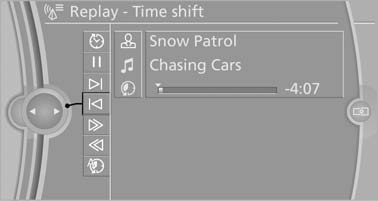
Replay - Time shift
▷ The red arrow shows the current playback
position.
▷ The time difference to the live broadcast is
displayed next to the buffer bar.
▷ For live transmissions "live".
Timeshift menu
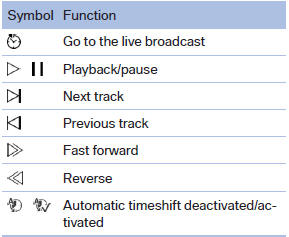
Automatic timeshift
When the function is activated, audio playback is stopped automatically in the event of:
▷ Incoming and outgoing telephone calls.
▷ Activation of the voice activation system.
▷ Muting.
The audio playback then continues with a time delay.
To activate:
1. "Radio"
2. "Satellite radio"
3.  "Replay - Time
shift"
"Replay - Time
shift"
4.  "Automatic time
shift"
"Automatic time
shift"
To deactivate:
 "Automatic time shift"
See also:
Fuses
Replacing fuses
Never attempt to repair a blown fuse and
do not replace a defective fuse with a substitute
of another color or amperage rating; this could
lead to a circuit overload, ultimate ...
Storing favorites
Up to 30 favorites can be stored in the favorites
list. Available favorites are artist, track, game,
league, and team.
Storing the artist, track, or game
It is only possible to store favorites t ...
What to do if...
Information on suitable mobile phones.
The mobile phone could not be paired or connected.
▷ Is Bluetooth activated in the vehicle and on
the mobile phone? Activate Bluetooth in the
vehicle ...