
Storing a station
1. "Radio"
2. "FM" or "AM"
3. Highlight the desired station.
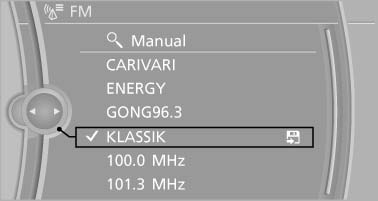
Highlight the desired station
4. Press the controller for an extended period.
5. Select the desired memory location.
The stations are stored for the remote control currently in use.
The stations can also be stored on the programmable memory buttons
See also:
Selecting channels
You can only listen to enabled channels.
The selected channel is stored for the remote
control currently in use.
Via the iDrive
1. "Radio"
2. "Satellite radio"
3. Select &qu ...
Interior motion sensor
The windows and glass sunroof must be closed
for the system to function properly. ...
Apps
At a glanceCertain software applications of a suitable mobile phone can be integrated into
the vehicle. These software applications are displayed on the Control Display. They
can be operated via i ...