
Changing the route criteria
1. "Navigation"
2. "Map"
3.  "Route
preference"
"Route
preference"
4. Select the criterion:
▷  "Fast route":
time-optimized route,
being a combination of the shortest possible
route and the fastest roads.
"Fast route":
time-optimized route,
being a combination of the shortest possible
route and the fastest roads.
▷  "Efficient
route": optimized combination
of the fastest and shortest route.
"Efficient
route": optimized combination
of the fastest and shortest route.
▷  "Short route":
short distance, irrespective
of how fast or slow progress will
be.
"Short route":
short distance, irrespective
of how fast or slow progress will
be.
▷ "Alternative routes": if available, alternative routes are suggested during active destination guidance. The individual suggestions are highlighted in color.
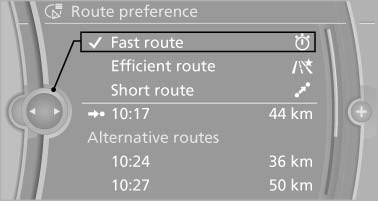
Alternative routes
5. Specify additional criteria for the route, if necessary:
▷ "Avoid highways": highways are
avoided wherever possible.
▷ "Avoid toll roads": toll roads are avoided
wherever possible.
▷ "Avoid ferries": ferries are avoided
where possible.
See also:
At a glance
These overviews of buttons, switches and
displays are intended to familiarize you with your
vehicle. You will also become quickly acquainted
with the available control concepts and options. ...
Comfort Access
Comfort Access enables you to enter your vehicle without needing to hold the
remote control in your hand. All you need to do is wear the remote control close
to your body, e.g. in your jacket pock ...
Selecting the distance
Selecting the distance
▷ Press the rocker down briefly:
Increase the distance.
▷ Press the rocker up briefly:
Decrease the distance.
▷ Press the rocker down briefly:
Increase ...