
Additional functions
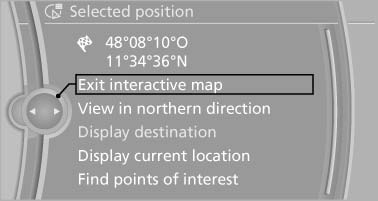
Additional functions are available on the interactive map after the controller is pressed.
Additional functions
▷  Select the
symbol.
Select the
symbol.
"Start guidance" or "Add as another
destination"
Add a destination as a further destination
▷ "Exit interactive map": return to the map
view.
▷ "View in northern direction" or "View in
driving direction"
▷ "Display destination": the map section
around the destination is displayed.
▷ "Display current location": the map section
around your current location is displayed.
▷ "Find points of interest": the search for special
destinations is started.
See also:
Bluetooth audio
At a glance
► Music files on external devices such as audio
devices or mobile phones can be played
back via Bluetooth.
Use of a mobile phone as an audio source,
refer to page 205.
► ...
Gentleman function
The front passenger seat can be adjusted with
the switches of the driver's seat.
1. Press the button. The LED
lights up.
2. Adjust the front passenger seat on your own
seat.
3. If needed, ...
External devices
At a glance
...