
Storing the destination in the address book
After entering the destination, store the destination in the address book.
1. Open "Options".
2. "Store as new contact" or "Add to existing contact"
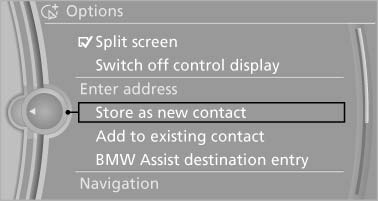
Store as new contact
3. Select an existing contact, if available.
4. "Business address" or "Home address"
5. Enter "Last name" and, if necessary, "First name".
6. "Store in vehicle"
See also:
The concept
Mobile phones or other external devices such as
audio players can be connected to the vehicle
via Bluetooth.
Bluetooth® is a registered trademark of Bluetooth
® SIG, Inc.
After these devices a ...
Storing a channel
1. "Radio"
2. "Satellite radio"
3. Select "All channels" or a desired category.
4. Select the desired channel.
5. Press the controller a ...
X5 M in the Market
Purists might grumble about the revered M badge spreading to BMW's
crossovers, but as other manufacturers have shown, there's money to be made in
high-performance SUVs; you need only look at Merce ...