
Updating the navigation data
General information
Navigation data are stored in the vehicle and can be updated.
Navigation data and authorization codes are available from your service center.
▷ Depending on the data volume, a data update
may take several hours.
▷ Update during the trip to preserve battery..
▷ During the update, only the basic functions
of the navigation system are available..
▷ The status of the update can be viewed..
▷ The system restarts after the update..
▷ The data carrier with the navigation data can
be removed after the update is complete.
Performing an update
1. Insert the navigation DVD into the DVD player with the labeled side facing up.
2. Follow the instructions on the Control Display.
3. Enter the authorization code of the navigation DVD and change the DVD if needed.
If the trip is interrupted, follow the instructions on the Control Display and restart the update if necessary.
Viewing the status
1. Open "Options".
2. "Navigation update"
Removing navigation DVD
1.  Press
button 1.
Press
button 1.
The DVD emerges slightly from the drive.
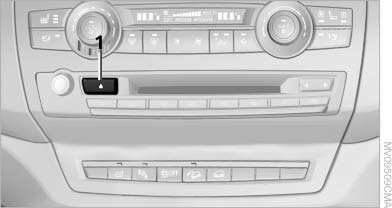
The DVD emerges slightly from the drive
2. Remove the DVD.
See also:
Ski bag
Capacity
The ski bag can be used to transport up to four
pairs of skis with a length of up to 6 ft/2.10 m or,
depending on the binding, up to two snowboards
with a length of up to 5 ft/1.60 m.
...
Controls
This chapter is intended to provide you with
information that will give you complete control of
your vehicle. All features and accessories that are
useful for driving and your safety, comfort an ...
Control Display
Notes
▷ To clean the Control Display, follow the care
instructions.
▷ Do not place objects close to the Control
Display; otherwise, the Control Display can
be damaged.
Switching o ...