
Setting compass zones
Set the compass zone corresponding to the vehicle's geographic location so that the compass
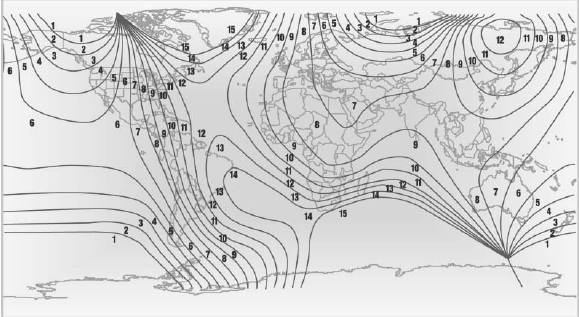
Setting compass zones
Press the adjustment button for 3‑4 seconds.
The number of the compass zone set is shown in the display.
To change the zone setting, briefly press the adjustment button repeatedly until the display shows the number of the compass zone corresponding to the current location. can function correctly; refer to the world map with compass zones.
The compass is operational again after approx.
10 seconds.
See also:
Messages
Information about messages. ...
System limits
Check the traffic situation as well
Check the traffic situation around the vehicle
with your own eyes. Otherwise, an accident
could result from road users or objects located
outside the pictu ...
Instrument cluster
The indicator and warning lamps can light up in
a variety of combinations and colors.
Several of the lamps are checked for proper
functioning when the engine is started or the ignition
is swi ...