
Manual air distribution
The air flow can be guided into the vehicle interior, separately for the driver's and front passenger side, using one of the following programs:
▷ Upper body region.
▷ Upper body region and footwell.
▷ Footwell.
▷ Driver's side: in addition, the windshield,
side windows, and footwell.
Selecting program
 Press the button repeatedly
until the
desired program is shown on the Control
Display.
Press the button repeatedly
until the
desired program is shown on the Control
Display.
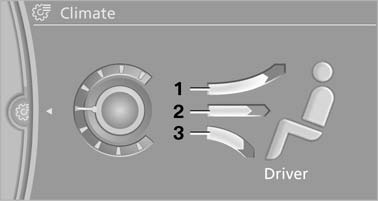
Selecting program
1. Air toward the windshield and side windows
2. Air for the upper body
3. Air to footwell
Pressing the AUTO button cancels the manual air distribution settings.
The automatic mode for the air volume remains effective with manual air distribution.
See also:
Saving a function
1. Highlight the function via the iDrive.
2.
Press the desired button for more
than 2 seconds. ...
Reprogramming individual buttons
1. Switch on the ignition.
2. Press and hold the interior rearview mirror
button to be programmed.
3. As soon as the interior rearview mirror LED
starts flashing slowly, hold the hand-held
tra ...
Notes
Switch off the engine before refueling
Always switch off the engine before refueling;
otherwise, fuel cannot be added to the
tank and a message will be displayed.◀
Observe when handlin ...