
Displays in the instrument cluster
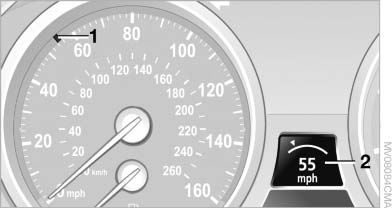 Displays in the instrument cluster
1 Stored desired speed
▷ Green: the system is active.
▷ Orange: the system is interrupted.
2 Selected desired speed appears briefly If the display --- mph or --- km/h appears briefly, conditions may not be adequate to operate the system.
Call up Check Control messages
See also:
Connecting
Connecting
1 Connections for audio/video cables. Watch
the colors of the sockets when connecting.
Yellow socket: video
White socket: audio on left
Red socket: audio on right
2 Power supply ...
Run-flat tires
The symbol identifying run-flat tires is a circle with the letters RSC on the
sidewall.
Run-flat tires comprise a conditionally self-supporting tire and a special rim.
The reinforcement in the ...
Emergency unlocking
Emergency unlocking
Pull the handle inside the cargo area.
The trunk lid unlocks. ...