
Display
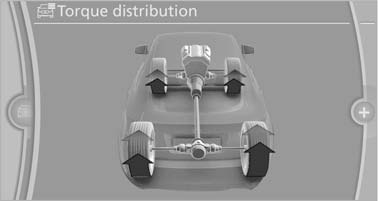
The Control Display shows how xDrive and Dynamic Performance Control are distributing the drive forces.
1. "Vehicle Info"
2. "Torque distribution"
Torque distribution
The current distribution of drive forces is indicated by arrows pointing to all four wheels.
The highlighted arrows show the drive forces currently present. The longer an arrow is, the greater the drive forces in the associated wheel.
The transparent arrows indicate the maximum value the drive forces over the last 10 seconds.
Malfunction
Malfunctions are displayed via Check Control
See also:
Renaming a station
A station with changing station names can be
renamed.
1. "Radio".
2. "FM" or "AM".
3. Select the desired station.
4. "Options" Open.
5. "Rename to:& ...
Example: setting the clock
Setting the clock
1. Press the button. The main
menu is
displayed.
2. Turn the controller until "Settings" is highlighted,
and then press the controller.
Turn the controller unti ...
2009 BMW 750 Review by Mike Hanley
When a redesigned 7 Series debuted for the 2002 model year, it was one of the
most controversial cars in recent history. Not only did it signal a new design
direction for BMW that rubbed many peop ...