
Displaying, setting or changing the limit
1. "Settings"
2. "Speed"
3. "Warning at:"
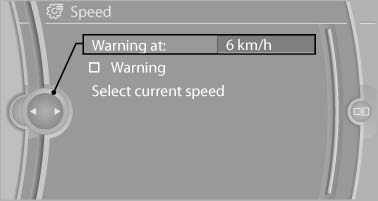
Warning at
4. Turn the controller until the desired limit is displayed.
5. Press the controller.
The speed limit is stored.
See also:
Safety belt reminder for the driver's and front passenger seat
The indicator lamp flashes or
lights up
and a signal sounds. Make sure that the
safety belts are positioned correctly.
The safety belt reminder is active at speeds
above approx. 5 mph/8 km/h ...
Programming
General information
1. Switch on the ignition.
2. Initial setup:
Press and hold the left and right button on
the interior rearview mirror simultaneously
for approximately 20 seconds until the L ...
Fold-out position of the wipers
Required when changing the wiper blades or
under frosty conditions, for example.
1. Switch off the ignition.
2. Under frosty conditions, ensure that the
wiper blades are not frozen onto the wind ...