
Viewing stored Check Control messages
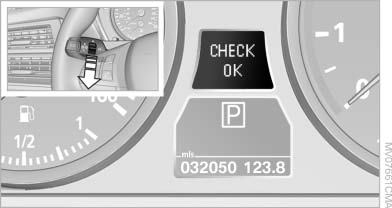
Viewing stored Check Control messages
1. Press the button on the turn signal lever downward. "CHECK OK" or the stored Check Control messages appear on the display.
„CHECK OK“ is shown if no messages are present.
Check Control messages are accompanied by text messages on the Control Display.
2. Press the button to display additional messages, the time and external temperature, or the date.
Displaying stored Check Control messages
1. "Vehicle Info"
2. "Vehicle status"
3.  "Check Control"
4. Select the text message.
See also:
Storing favorites
Up to 30 favorites can be stored in the favorites list. Available favorites are
artist, track, game, league and team.
Storing the artist, track or gameIt is only possible to store favorites that ar ...
Reference
This chapter contains technical data, short
commands for the voice activation system, and an
index that will quickly take you to the information
you need. ...
Vehicle equipment
All standard, country-specific and optional
equipment that is offered in the model series is
described in this chapter. Therefore, equipment
is also described that is not available in a vehicle, ...