
Displays on the Control Display
Display the computer or trip computer on the Control Display.
1. "Vehicle Info"
2. "Onboard info" or "Trip computer"
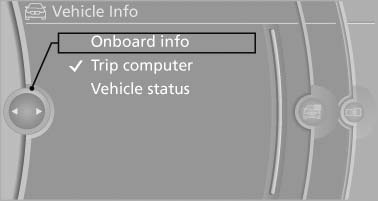
Onboard info
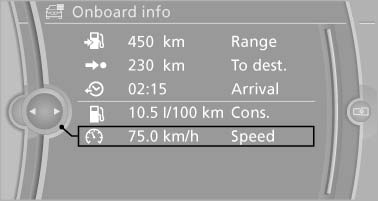
Displays on the "Onboard info":
Onboard info
▷ Range.
▷ Distance to destination.
▷ Estimated time of arrival if a destination was entered in the navigation
system
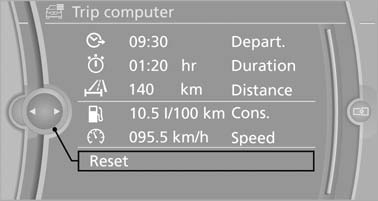
Displays on the "Trip computer":
Trip computer
▷ Departure time.
▷ Trip duration.
▷ Trip distance.
Both displays show:
▷ Average fuel consumption and
▷ Average speed.
Resetting the fuel consumption and speed
Resetting the values for average speed and average fuel consumption:
1. Select the respective menu item and press the controller.
2. Press the controller again to confirm your selection.
Resetting the trip computer
Resetting all values:
1. "Vehicle Info"
2. "Trip computer"
3. "Reset"
See also:
Transmitting the settings
Your personal settings can be taken with you to
another vehicle equipped with the Personal Profile
function. For more information, contact your
service center.
Transmission takes place via:
& ...
General driving notes
Closing the tailgate
Drive with the tailgate closed
Only drive with the tailgate closed; otherwise,
in the event of an accident or braking or
evasive maneuvers, passengers or other road
users ma ...
General information
The glass sunroof and the sliding visor can be
operated together or separately, using the same
switch.
The glass sunroof is operational when the ignition
is switched on.
Danger of pinching
Mo ...