
Releasing the parking brake manually
In the event of an electrical power loss or electrical malfunction, you can release the parking brake manually.
 Secure the vehicle against rolling
Before releasing the parking brake manually,
and whenever you park the vehicle with the
parking brake released, ensure that position P of
the automatic transmission is engaged. Note
the display in the instrument cluster.
In addition, secure the vehicle against rolling, e.g. with a wheel chock. Otherwise there is a danger that the vehicle could roll if parked on a steep slope.◀
Jump-starting and towing
Unlocking
1. Open the left-hand side panel in the cargo area.
2. Remove the first aid kit and the warning triangle.
Close the bracket of the warning triangle.
3. Insert the releasing tool or screwdriver, contained in the tool kit under the cargo floor panel, at the releasing point.
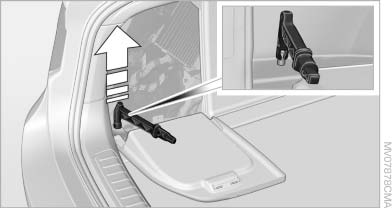
Unlocking
4. Firmly pull the releasing tool or screwdriver upward against the mechanical resistance, refer to arrow, until a considerable increase in force is felt and the parking brake is then clearly heard to release.
5. Stow the releasing tool or screwdriver, warning triangle, and first aid kit and close the left side panel in the cargo area.
Have the malfunction corrected
Have the malfunction corrected at the
nearest service center or at a workshop that
works according to BMW repair procedures with
correspondingly trained personnel. If the parking
brake has been released manually in response
to a malfunction, only technicians can
return it to operation.◀
Following manual release, the actual status of the parking brake may deviate from that displayed by the indicator lamp.
See also:
Power failure
After a temporary power loss, some equipment
needs to be reinitialized.
Individual settings need to be reprogrammed:
▷ Seat and mirror memory: store the positions
again.
▷ Time: upd ...
Language
Setting the language
To set the language on the Control Display:
1. "Settings"
2. "Language/Units"
3. "Language:"
4. Select the desired language.
The setting is s ...
Display on the Control Display
Switching on the backup camera via
iDrive
With Top View switched on:
"Rear view camera"
The backup camera image is displayed. The setting
is stored for the remote control currently i ...