
Tasks
Displaying task list
Display open tasks that must be completed within the next 90 days.
1. "Office"
2. "Tasks"
1. Select the top line in the task list.
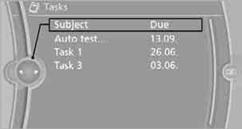
2. To select a sorting criterion:
> "Priority (!)"
> "Subject"
> "Due date"
1. Select the desired task.
2. To scroll through the task, if necessary:
> Turn the controller.
> Select the 
 symbol.
Using contact data
Contact data from appointments, tasks, text messages, emails, and notes can be stored or selected.
Reading a task aloud
Reading a task aloud.
See also:
Radio
FM
AM
Weather Band
Satellite radio
Stored stations
...
Malfunction
The yellow warning lamp flashes and
then lights up continuously. A Check
Control message is displayed. No flat
tire can be detected.
Display in the following situations:
A wheel without T ...
Cupholders
Notes
Shatter-proof containers and no hot
drinks
Use light and shatter-proof containers and do
not transport hot drinks. Otherwise, there is the
increased danger of injury in an accident.
U ...