
External devices
Overview
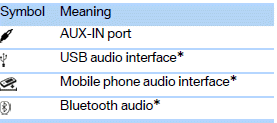
AUX-IN port
Overview> It is possible to connect audio devices, e.g. MP3 players. Sound is output
over the vehicle speakers.
> Recommended settings: mid-level tone and volume settings on the audio device.
Tone may depend on the quality of the audio files.
Lift up the center armrest.
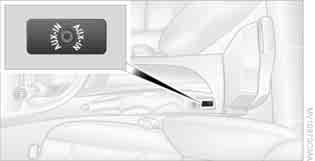
Connection for audio playback:
TRS connector 1/8 in/3.5 mm.
The AUX-In connection is in the center armrest.
Connect the headphone connection or line-out connection of the device to the jack
plug.
1. Connect the audio device, switch it on, and using the audio device, select
a track.
2. "CD/Multimedia"
3. "External devices" if applicable
4. "AUX front"
The volume of the sound output depends on the audio device. If this volume differs markedly from the volume of the other audio sources, it is advisable to adjust the volumes.
Adjusting volume
1. "CD/Multimedia"
2. "External devices" if applicable
3.  "AUX front"
4. "Volume"
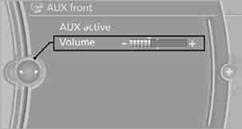
5. Turn the controller until the desired volume is set and then press the controller.
See also:
Starting the engine
Never use spray fluids to start the engine.
1. Start the engine of the assisting vehicle and
let it run for several minutes at an increased
idle speed.
2. Start the engine of the vehicle being s ...
Loading
1. Fold down the center armrest, press the button
and open the cover.
Loading
2. Press the button again; the cover in the
cargo area opens. If you press the button
firmly the first time, thi ...
Hiding Check Control messages
Hiding Check Control messages
Press the button in the turn signal lever up or
down.
▷ Some Check Control messages are displayed
continuously and are not cleared until
the malfunction i ...