
CD changer
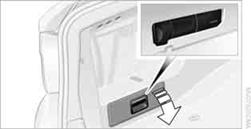
The BMW CD changer for six CDs is behind the left side panel in the cargo area.
Removing the CD magazineTo insert or remove CDs from the CD magazine, you must first remove it from the CD changer:
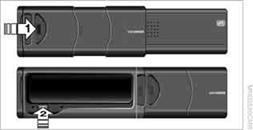
1. Push the cover to one side, arrow 1.
2. Press the button, arrow 2.
The CD magazine will be ejected.
Push the magazine back in after at least 2 seconds have passed so that the inserted CDs can be read in again.
Inserting/removing CDs from the CD magazine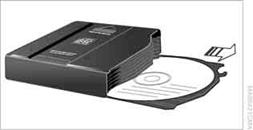
When loading CDs into or removing them from the CD magazine, hold them at their edges and do not touch the reflective signal-sensing area.
Inserting CDs:
Insert one CD per compartment with the labeled side up.
Removing CDs:
Pull out the desired compartment and take out the CD.
Inserting the CD magazine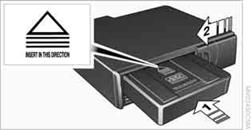
Insert the CD magazine all the way in the direction of arrow 1and close the cover, arrow 2.
The CD changer automatically reads in the loaded CDs and is then ready for operation.
See also:
Automatic headlamp control
Switch position :
the low beams are switched
on and off automatically, e.g., in tunnels, in twilight
or if there is precipitation. The LED next to
the symbol lights up.
A blue sky with the s ...
Deleting stored functions
Press and hold the left and right button on the
interior rearview mirror simultaneously for approximately
20 seconds until the LED flashes
rapidly. All stored functions are deleted. The
functions ...
Switching off
The system can be deactivated as follows:
▷ Press the button.
▷ Switch off the ignition. ...