
Opening the favorites
If an activated favorite is being played, the message "Favorite alert!" appears for approx.
20 seconds.
Select  "Favorites" while the alert message is
being displayed.
"Favorites" while the alert message is
being displayed.
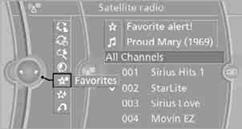
The displayed favorite is played.
If there is no message, the system changes to the My Favorites category. All favorites currently being broadcast can be selected from a list.
See also:
Front
...
Text messages
Text messages in combination with a symbol in
the instrument cluster explain a Check Control
message and the meaning of the indicator and
warning lamps. ...
BMW X5 xDrive35i: BMW's Turbocharged Inline-6 with Valvetronic.
BMW X5 xDrive 35i receives a brand new inline-6 gasoline engine, internally
dubbed "N55." The new engine features the same 3.0-liter displacement and 300
horsepower output of its predece ...