
Managing a subscription
To be able to enable or unsubscribe from the channels, you must have reception. It is usually at its best when you have an unobstructed view of the sky. The channel name is displayed in the status line.
Enabling the channelsThe Unsubscribed Channels category contains all disabled channels.
1. "Radio"
2. "Satellite radio"
3.  "Category"
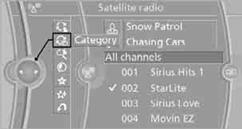
4. Select the Unsubscribed Channels category.
5. Select the desired channel.
The phone number and an electronic serial number, ESN, are displayed.
6. Select the phone number to have the channel enabled.
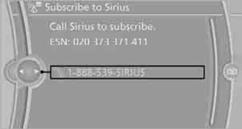
You can also unsubscribe from the channels via this phone number.
Unsubscribing from channels1. "Radio"
2. "Satellite radio"
3. Open "Options".
4. "Manage subscription"
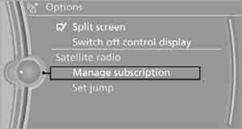
The phone number and an electronic serial number, ESN, are displayed.
5. Call Sirius to unsubscribe from the channels.
See also:
Display visibility
The visibility of the displays in the Head-up Display
is influenced by:
▷ Certain sitting positions.
▷ Objects on the cover of the Head-up Display.
▷ Sunglasses with certain pol ...
Display
Information stage
The dimmed lamp in the mirror housing indicates
when there are vehicles in the blind spot
or approaching from behind.
Warning
If the turn signal is set while a vehicle is in ...
Options menu
The split screen is not available and there is no
Integrated Owner's Manual.
Operation is the same as for the front menu options. ...