
Radio Data System RDS
In the FM waveband, additional information is transmitted via RDS. If the reception conditions are good, the station names are shown on the Control Display. Where reception is poor or in the event of interference, it may take some time before the station names appear in the display.
Switching the RDS on/off
1. "Radio"
2. "FM"
3. Open "Options".
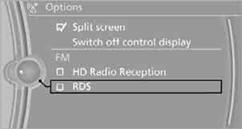
4. "RDS"
The setting is stored for the remote control currently in use.
See also:
Initialization after a power failure
After a power failure, it is only possible to raise
the roof, if necessary.
Have the system initialized by your service center. ...
Filtering the message list
The message list can be filtered, when more
than one type of message exists.
1. "Filter:"
2. Select the type of message.
"All"
All messages are displayed.
"E-m ...
New for 2011
A new eight-speed automatic transmission is standard on the 2011 models and
replaces a six-speed automatic. The xDrive35i has BMW's new single-turbo
3.0-liter inline six-cylinder (replacing a twin ...