
Storing stations
Via iDrive
1. "Radio"
2. "FM" or "AM"
3. Select the desired station.
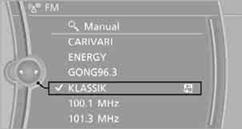
4. Press the controller for an extended period.
5. Select the desired memory location.
The stations are stored for the remote control currently in use.
Via programmable memory keysYou can store a station on the programmable memory keys.
1. Select a station.
2. Press and hold the desired button
 ...
...  .
.
See also:
BMW Info
General information
Messages from BMW regarding service actions
and news from BMW.
Selecting additional functions
The following functions are available when a
message is selected:
...
Increasing or decreasing vehicle speed
You can specify your desired speed in the range
from approx. 4 mph/6 km/h to approx. 15 mph/
25 km/h using the rocker switch of the cruise
control on the steering wheel. You can change
the veh ...
Example: playing back a CD
1. Switch on the Entertainment sound output
if necessary.
2. Press the button on the
steering
wheel.
3. ›C D and multimedia‹
The medium last played is played back.
4. Press the button on t ...