
Tone control
You can alter various tone settings, e.g. treble and bass or the speed-dependent volume increase.
The tone settings are applied to all audio sources.
The settings are stored for the remote control currently in use.
Treble, bass, balance, fader> "Treble": height adjustment.
> "Bass": depth adjustment.
> "Balance": left/right volume distribution
> "Fader": front/rear volume distribution
Adjustments
1. "CD/Multimedia", "Radio" or "Settings".
2. "Tone"
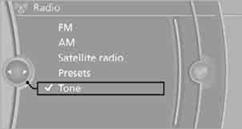
3. Select the desired tone setting.
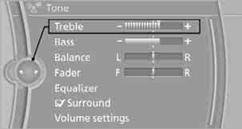
4. To adjust: turn the controller.
5. To store: press the controller.
You can set individual sound frequency ranges.
1. "CD/Multimedia", "Radio" or "Settings".
2. "Tone"
3. "Equalizer"
4. Select the desired setting.
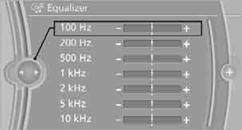
5. To adjust: turn the controller.
6. To store: press the controller.
Multi-channel playback, surroundYou can choose between stereo and multichannel playback, surround.
1. "CD/Multimedia", "Radio" or "Settings".
2. "Tone"
3. "Surround"
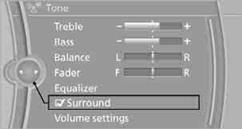
When surround is activated, multi-channel playback is simulated when playing an audio track in stereo.
Volume> "Speed volume": volume is adapted depending on the speed
> "PDC": volume of the PDC acoustic signal relative to the entertainment
sound output
> "Gong": volume of the acoustic signal, e.g. for the acoustic seat belt warning
relative to the entertainment sound output
> "Microphone": volume of the microphone during a phone conversation.
> "Loudspeak.": volume of the speaker during a phone conversation
Adjustments
1. "CD/Multimedia", "Radio" or "Settings".
2. "Tone"
3. "Volume settings"
4. Select the desired volume setting.
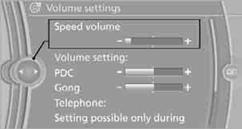
5. To adjust: turn the controller.
6. To store: press the controller.
You can reset all tone settings to the default setting.
1. "CD/Multimedia", "Radio" or "Settings".
2. "Tone"
3. "Reset"
See also:
Safety switch for the rear
Press the button on the driver's door if
children are being transported in the
rear.
This locks various functions so that they cannot
be operated from the rear: safety switch. ...
Applying
The lever automatically engages after being
pulled up. ...
Automatic Service Request
Data regarding the maintenance status or legally
mandated inspections of the vehicle are automatically
transmitted to your service center before
a service due date.
You can check when your serv ...