
Route criteria
General information
> You can influence the calculated route by selecting certain trip criteria.
> Route criteria can be changed during destination entry and during route guidance.
> Street types are part of the navigation data and are taken into account in route
planning, e.g. avoiding highways.
> The proposed route can differ from personal experience.
> The settings are stored for the remote control currently in use.
> Route guidance with traffic bulletins.
1. "Navigation"
2. "Map"

3.  "Route preference"
4. Selecting a criterion:
> "Fast route": time-optimized route through
a combination of the least possible distance and stretches of road that allow rapid
driving.
>  "Efficient route": optimized combination of the
fastest and shortest possible route.
"Efficient route": optimized combination of the
fastest and shortest possible route.
>  "Short route": short distance without taking time
into account.
"Short route": short distance without taking time
into account.
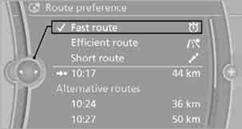
> "Alternative routes": are suggested, where possible, during active route guidance. The individual suggestions are labeled in color.
5. Select additional route criteria, if desired.
Where possible, the selected criteria will be avoided on the route.
> "Avoid highways": highways are avoided where possible.
> "Avoid toll roads": toll roads are avoided where possible.
> "Avoid ferries": ferries are avoided where possible.
The setting applies to the current route and to the planning of future routes.
See also:
Electrically adjustable seats
At a glance
1 Seat and mirror memory
2 Backrest width
3 Lumbar support
4 Backrest tilt
5 Forward/backward, height, seat tilt
Note
The seat setting for the driver's seat is stored for
the re ...
Opening the Options menu
Press the button.
The "Options" menu is displayed.
Additional options: move the controller to the
right repeatedly until the "Options" menu is displayed.
Options menu
The ...
Settings for the map view
The settings are stored for the remote control
currently in use.
1. "Navigation"
2. "Map"
3. "Options" Open.
4. "Settings"
Set the map view.
▷ &qu ...