
Destination entry via map
If you only know the location of a destination or street, then you can enter the destination with the aid of the map.
Selecting the destination1. "Navigation"
2. "Map"
The current position of the vehicle is displayed on the map.
3.  "Interactive map"
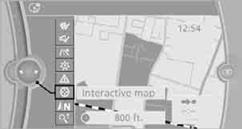
4. Select the destination with the cross-hairs.
> To change the scale: turn the controller.
> To shift the map: move the controller in the required direction.
> To shift the map diagonally: move the controller in the required direction and
turn it.
5. Press the controller to display additional menu items.
> Select the  symbol: "Start guidance" or "Add
as another destination".
symbol: "Start guidance" or "Add
as another destination".
> "Find points of interest": the search for special destinations is started.
Specifying the street
If the system cannot recognize a street, it displays one of the following pieces of information:
> A street name in the vicinity.
> The district.
> The coordinates of the destination.
In the interactive map, the scale can be adjusted and the visible map section can be shifted. In addition, pressing the controller makes further functions available:
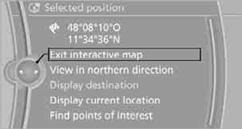
> Select the  symbol.
"Start guidance" or "Add as another destination".
> "Exit interactive map":
Go back to the map view.
> "View in northern direction" or "View in driving direction".
> "Display destination": the section of the map around the destination is displayed.
> "Display current location":
The section of the map around the current position is displayed.
> "Find points of interest".
See also:
Notes
Working in the engine
compartment
Never attempt to perform any service or
repair operations on your vehicle without the
necessary professional technical training.
If you are unfamiliar with t ...
Navigation data
General informationNavigation data and authorization codes are available from your BMW center. Navigation
data are stored in the vehicle and can be updated.
> Depending on the data volume, a dat ...
Odometer and trip odometer
▷ Odometer, arrow 1.
▷ Trip odometer, arrow 2.
Display/reset miles
Press the knob.
▷ When the ignition is switched
off, the time, external temperature
and odometer are disp ...