
Instrument lighting
You can adjust the brightness of the instrument lighting only when the parking lamps or the low beams are switched on.
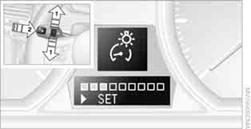
1. Push button 1in the turn signal/high beam lever up or down repeatedly
until the appropriate symbol appears in the display, accompanied by the brightness
level and the word "SET".
2. Press button 2.
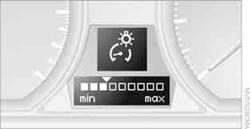
3. Push button 1up or down to select the desired brightness level.
4. Press button 2.
The display again shows the outside temperature and the time.
See also:
Front
Seat heating
The temperature setting progresses one step
through its control sequence each time you
press the button. The maximum temperature is
reached when three LEDs are lit.
To switch of ...
Environmental conditions
▷ Say the commands, numbers, and letters
smoothly and with normal volume, emphasis,
and speed.
▷ Always say commands in the language of
the voice activation system.
▷ When se ...
Using BMW TeleService
BMW TeleService are typically activated in the
vehicle.
Even if the BMW TeleService are not active, a
voice contact to Roadside Assistance is still
possible.
To continue using or to deactivate ...