
Clock
The settings are stored for the remote control currently in use, refer also to Personal Profile on page 28.
Setting the timeIn the instrument cluster
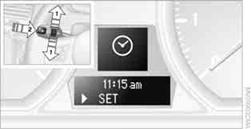
To set the 12h/24h format, refer to Setting the time format on page 77.
1. Push button 1in the turn signal/high beam lever up or down repeatedly
until the appropriate symbol appears in the display, accompanied by the time and
the word "SET".
2. Press button 2.
3. Use button 1to set the hours.
4. Press button 2to confirm the entry.
5. Use button 1to set the minutes.
6. Press button 2to confirm the entry.
7. Press button 2.
The system accepts the new time.
Via iDrive
1. Press the MENUbutton.
The main menu is displayed.
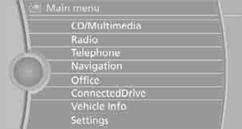
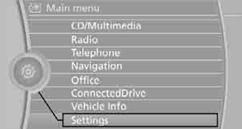
2. "Settings"
Setting the time
1. "Settings"
2. "Time/Date"
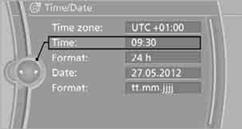
3. "Time:"
4. Turn the controller until the desired hours are displayed, and then press
the controller.
5. Turn the controller until the desired minutes are displayed, and then press
the controller.
The time is stored.
Setting the time format
1. "Settings"
2. "Time/Date"
3. "Format:"
4. Select the desired format and press the controller.
The time format is stored.
Setting time zone
1. "Settings"
2. "Time/Date"
3. "Time zone:"
4. Select desired time zone. The time zone is stored.
See also:
Setting the language
Press the adjustment button for 12‑13 seconds.
Briefly press the adjustment button again to
switch between English "E" and German "O".
The setting is automatically saved ...
Function
After the safety belt is buckled and the door is
closed, the front belts are automatically tightened
once after the vehicle is driven is away.
In critical driving situations, the following indivi ...
Malfunction
The small warning
lamp flashes in yellow
and then lights up continuously;
the larger warning lamp comes on in
yellow. On the Control Display, the
tires are shown in gray and a message appear ...