
Installing child restraint systems
 Observe the child restraint system manufacturer's
instructions when selecting, installing and using child restraint systems. Otherwise,
the protective effect may be diminished.
Observe the child restraint system manufacturer's
instructions when selecting, installing and using child restraint systems. Otherwise,
the protective effect may be diminished.
Standard child restraint systems are designed to be secured with a lap belt or with the lap-belt section of a lap-and-shoulder belt. Incorrectly
or improperly installed child restraint systems can increase the risk of injury to children. Always follow the installation instructions for the system with the greatest care.
On the front passenger seat After installing a child restraint system on
the front passenger seat, make sure that the front and side airbags for the front
passenger are deactivated; otherwise, there is an increased risk of injury if the
airbags deploy.
Seat position
Before installing a child restraint system, move the front passenger seat as far back and up as possible to obtain the best possible position for the belt. Do not change the seat position after this.
Backrest width
The backrest width of the front passenger seat
must be at its widest possible setting. Do not change the setting after installing
the child seat; otherwise, the child seat's stability on the front passenger seat
is limited.
1. Adjust the backrest width to its widest setting.
2. Install the child seat.
Child seat security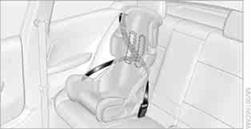
The rear safety belts and the front passenger safety belt can be prevented from being pulled out in order to fasten child restraint systems.
To lock the safety belt
1. Secure the child restraint system with the belt.
2. Pull the belt strap all the way out.
3. Allow the belt strap to retract and pull it taut against the child restraint
system.
The safety belt is locked.
To unlock the safety belt
1. Open the belt buckle.
2. Remove the child restraint system.
3. Allow the safety belt strap to retract all the way.
See also:
Notes
Do not cover lower screen edge, since this
is where the sensors and the infrared interface
are installed.
When loading the rear seats and adjusting
the backrest of the front seat, fold i ...
Opening
▷ Press the switch to the
resistance
point.
The window opens while the switch is held.
▷ Press the switch beyond the
resistance
point.
The window opens automatically.
Pressin ...
Wheel/tire damage
Due to low-profile tires, please note that wheels,
tires and suspension parts are more susceptible
to road hazard and consequential damages.
Inspect your tires often for damage, foreign objects
...