
Programmable memory keys
General information
iDrive functions can be stored on the programmable memory keys and called up directly, e.g. radio stations, navigation destinations, phone numbers and entry points into the menu.
The settings are stored for the remote control currently in use.
Storing functions1. Highlight the function via the iDrive.
2. Press the desired button  ...
...
 for longer than two seconds.
Press the ...
button.
The function is executed immediately. This means, for example, that the number is dialed when a phone number is selected.
Displaying memory key assignmentsTouch the button with a finger. Do not wear gloves or use objects.
The key assignment is displayed at the top edge of the screen.
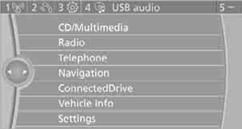
> Displaying brief information: press the button.
> Displaying detailed information: press and hold the button.
See also:
At a glance
These overviews of buttons, switches and
displays are intended to familiarize you with your
vehicle. You will also become quickly acquainted
with the available control concepts and options. ...
Lumbar support
The curvature of the seat backrest can be adjusted
in such a way that it supports the lumbar
region of the spine. The lower back and the
spine are supported for upright posture.
► Press the ...
Temperature
Turn the wheel to set the desired
temperature.
Turn the wheel to set the desired
temperature.
The automatic climate control achieves this
temperature as quickly as possible, if necessary
w ...