
Status information
Status box
The status box at the top right displays the following information:
> Time
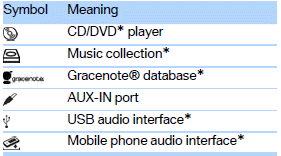
> Current entertainment source
> Sound output ON/OFF
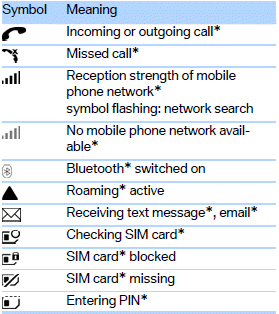
> Mobile phone network with strongest reception
> Telephone status
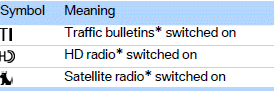
> Traffic reports reception
Radio symbols
See also:
System limits
Changes to the parking space
Changes to the parking space after it was
measured are not taken into account by the system.
Therefore, always be alert and ready to intervene;
otherwise, there is ...
Assist system information
Display on the Control Display
Information on the Assist system can be displayed
by activating Assist on the Control Display.
1. "Settings"
2. "Control display"
3. "Driv ...
Adjusting
The following settings are available:
"Rear displays"
"Language/Units": language can be set
globally for all screens.
"Tone"
...