
Example: setting the clock
1. Press the  button.
The main menu is displayed.
2. Turn the controller until "Settings" is highlighted, and then press the controller.
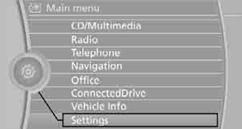
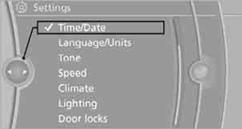
3. If necessary, move the controller to the left to display "Time/Date".
4. Turn the controller until "Time/Date" is highlighted, and then press the
controller.
5. Turn the controller until "Time:" is highlighted, and then press the controller.
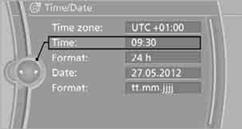
6. Turn the controller to set the hours and press the controller.
7. Turn the controller to set the minutes and press the controller.
See also:
General information
The engine oil consumption is dependent on the
driving style and driving conditions.
Therefore, check the engine oil level after every
refueling using the electronic engine oil level
check. ...
Treble, bass, balance, and
fader
▷ "Treble": treble adjustment.
▷ "Bass": depth adjustment.
▷ "Balance": left/right volume distribution.
▷ "Fader": front/rear volu ...
Displays
Program selection
Pressing the button displays a list
of the selectable programs.
Selected program
The selected program is displayed
in the instrument cluster.
Display on the Control D ...