
Front head restraints
Correctly adjusted head restraint
A correctly adjusted head restraint reduces the risk of injury to cervical vertebrae in the event of an accident.
 Adjusting the head restraint
Correctly adjust the head restraints of all
occupied seats; otherwise, there is an increased
risk of injury in an accident.◄
Height
Adjust the head restraint so that its center is approximately at ear level.
Distance
Adjust the distance so that the head restraint is as close as possible to the back of the head.
If necessary, adjust the distance by adjusting the tilt of the backrest.
Active head restraint
In the event of a rear-end collision with a certain severity, the active head restraint automatically reduces the distance from the head.
Reduced protective function
► Do not use seat or head restraint covers.
► Do not hang objects, e.g., clothes hangers,
on the head restraints.
► Only attach accessories approved by BMW
to the seat or head restraint.
Otherwise, the protective function of the active
head restraint will be impaired and the personal
safety of the occupants will be endangered.◄
Adjusting the height
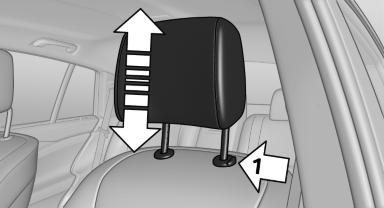
► To raise: pull.
► To lower: press the button, arrow 1, and
push the head restraint down.
Removing
The head restraints cannot be removed.
See also:
Supplementary text messages
Addition information, such as on the cause of a
fault or the required action, can be called up via
Check Control. The supplementary text of urgent
messages is displayed automatically.
It is sh ...
Malfunction of driving stability control systems
Adapting your driving style
When driving on poor roads, avoid using
full throttle or pressing the accelerator beyond
the kickdown point and also avoid heavy braking.
Otherwise, the drive train ...
Route criteria
General information
▷ The route calculated can be influenced by
selecting certain criteria.
▷ The route criteria can be changed when the
destination is entered and during destination ...