
Around the center console: controls and displays
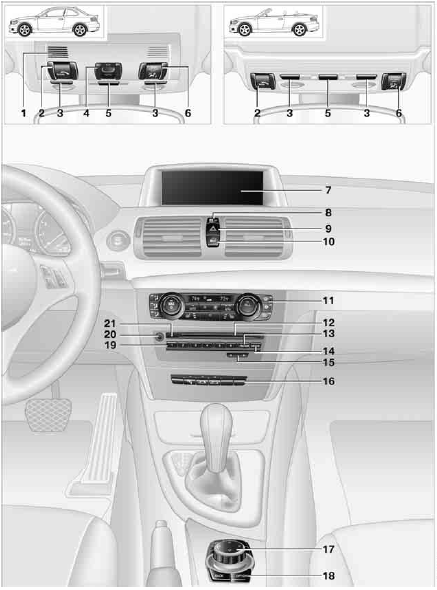
1. Coupe: microphone for voice activation systemand for telephonein
hands-free mode
Convertible: microphone on steering column
2. SOS: initiating an Emergency Request call
3. Reading lamps
4. Coupe: glass roof, electric
5. Interior lamps
6. Passenger airbag status lamp
7. Control Display
8. Driving stability control systems
> Dynamic Stability Control DSC
> Dynamic Traction Control DTC
9. Hazard warning flashers
10.Central locking system
11.Automatic climate control
 Air distribution to the windshield
 Air distribution to the upper body area
 Air distribution to the footwell
 Automatic air distribution and flow rate
 Cooling function
 Automatic recirculated air control
AUC and recirculated air mode
 Maximum cooling
 program
 Air volume
 Defrosting windows
 Rear window defroster
 Heated seats
12.CD/DVD drive
13.Selecting AM or FM waveband
14.Changing the audio and entertainment sources
15.Changing
> Radio station
> Track
16.  Convertible: open convertible top
 Convertible: closing the convertible top
17.Controller
Can be turned, pressed, or moved in four directions
18.Buttons on the controller
Selecting menus directly
19.Programmable memory keys
20.Switching entertainment audio sources on/off and adjusting volume
21.Ejecting a CD/DVD
See also:
Programmable memorybuttons
General information
The iDrive functions can be stored on the programmable
memory buttons and called up directly,
e.g., radio stations, navigation destinations,
phone numbers and entry points into ...
Deactivating/activating DTC Dynamic Traction Control
Activating the Dynamic Traction Control DTC
provides maximum traction on loose ground.
Driving stability is limited during acceleration
and when driving in bends.
Activating DTC
Activating DT ...
The interior: premium finish, dynamic lines, driver-friendly cockpit
Inside, a combination of typical BMW design features and innovative accents
gives the new BMW 1-Series a fresh, youthful and modern feel, with a focus on
spaciousness and driving pleasure. Lines a ...