
Message from the Concierge service
Starting destination guidance
1. Select the desired message.
2.
 "Start guidance" or "Add as another
destination"
"Start guidance" or "Add as another
destination"
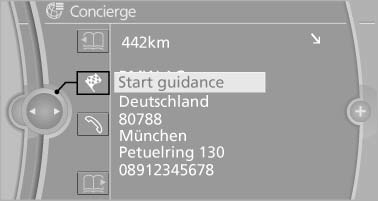
3. Start destination guidance, if necessary.
Dialing the number in the message
Up to 4 phone numbers can be transmitted with a message.
1. Select the desired message.
2.
 "Call":
If the message contains a number, the connection is established.
"Select phone number":
If the message contains more than one number, select the desired number from the list. The connection is established.
Storing an address
1. Select the desired message.
2. Open "Options".
3. "Store contact in vehicle"
Displaying additional information
1. Select the desired message.
2. "Further information"
See also:
Right-hand/left-hand steering
The digital compass is set for right-hand or lefthand
steering at the factory ...
Driving Experience Switch
The concept
The Driving Experience Switch can be used to
adjust the driving dynamics of the vehicle. For
this purpose various programs are available for
selection that are activated via the two ...
Using this Owner's Manual
We have tried to make all the information in this Owner's Manual easy to find.
The fastest way to find specific topics is to refer to the detailed index at the
back of the manual. If you wish ...